I was planned to use this phone for about 2 years before I decides to change a new one. However that bugger theif, spoilt my plan and I was now headache to think on what phone should I buy.
Alrite this is how it was happened:
Yesterday, Nico and I was out to Sg Wang to buy some clothes for coming Chinese New Year. As we walked out of the mall, the sky already turned dark which I think it was around 7pm so we decided to return back to home. We took a City (Bandar) Rapid KL bus from Bukit Bintang to Pasar Seni, and then walked to Pasaramakota where the Rapid KL bus interchange located. We would need to take U88 in order to back to Pelangi Damansara there, however the bus did not appeared on schedule.
After a long wait, finally U88 appears and the crowds started to squeeze one another in order to get up on the bus. I knew most people get pick pocket'ed during this situations, so I told Nico to be careful with her things. Well at the same time I was taking care of my belongings too and at that moment my phone was still in my pocket. However those people there are pushing one another, and I finally get through of the crowd and went on board of the bus. That is the moment I realized that my phone was gone.
They are really skilled, and I really took my hats off for that damn theif. They managed to sense where my phone located and pick it out without anybody aware of it. I didn't even ever took my phone out since I was at Sg. Wang.
Now my N70 was gone. Is not just a phone. N70 is my
1. Phonebook
2. Organizer for Notes, Task, Calenders
3. Mp3 player
4. Lite Camera
5. Torchlight
6. Alarm Clock
7. Book (I stored some e-books in there and usually read that when I wait for bus)
8. Game device (My favorite game "The Sims" are gone)
9. Dictionary
10. Bible
11. Video player
12. Sound/Video recorder
and of course my Contacts, SMS'es, Photo's, Video's which stored in the memory card, and my SIM cards. It just sux.
So who to blame? My Luck? Forget about it. Even if I lodge a police report, I guess they would just proudly says "Biasa LAH" (Means "it's common" in malay language) and no action taken.
Monday, January 14, 2008
My N70 was gone
Thursday, February 01, 2007
Picture of Sexy N70
Here is some of the looks after I got this full black casing. Now 95% looks like Music Edition N70 already.. :).jpg)
.jpg)
.jpg)
.jpg)
.jpg)
.jpg)
.jpg)
.jpg)
Enjoy.... :)
Friday, December 22, 2006
Say goodbye to N70 default power saver!
Yes, there are plenty custom powersaver available for you to download which is free-of-charge. Feel bored with your powersaver? Get it changed, with no extra application needed, and it serve you just as exactly as the default powersaver. :)
This is the original N70 powersaver.

This is S60 3rd Series powersaver, now you can get it and run it in your S60 2nd Series!
This is powersaver that I am using.
*All works belongs to the developer of VaScrSaver. :)
* File would be removed after 6months of inactivity.
Enjoy customizing. :)
Click the link below to download
http://files-upload.com/files/36044/VaScrSaver.zip.html
Alternate Download link
http://rapidshare.com/files/14133915/VaScrSaver.zip.html
Monday, December 18, 2006
N70 Music Edition Firmware Review
I just update my firmware again from the normal N70 firmware to real music edition firmware. Well, it has no significant difference between the standard v5.0638.3.0.1 with the music edition one.
Changes made
The first difference is that Music Edition fresh boot in the green theme which like what you've seen in all of the Music Edition adverts instead of the standard blue theme.
Of course, the media key  now becomes the dedicated music keys. It is not customizable compared to the standard edition firmware. A short press would activate the music player and a long press would activate the radio.
Well, in standard edition, the long press of the # key  would bring the line switch prompt which switch between line1 and line2. For me, I don't even need the line switching shortcut. In older N-Series firmware, a long press of # key would switch profiles between silent and general. This is more useful than line switching shortcut for most of us, I believe. Luckily in the Music Edition firmware, long press of # still switch between profiles instead of active line. :)


A long press of # key activates the Silent Profile in Music Edition
Music Player
This new firmware for both standard and music edition now supports the AD-41 music adapter flawlessly. I just simply love it. However the default music player has no improvement at all compared to the previous firmware. I don't understand the needs of scanning whole Memory Card to get all your MP3 into the list everytime you open the player. Not only this, when you access the playlist, it again read all the ID3 tags each time the playlist was accessed. I had around 150 mp3's in that playlist and everytime it took me nearly 1minute to get my playlist accessed. Is this a smart way of Nokia's Music Player managing the song information? Its forgiveable for the standard edition firmware music player to behave such way as it's not really tailored for music purposes.
Yet in Music Edition, no imporvement was made. The player is still same as the old N70 firmware. A music player which takes ages to load the playlist, no function to edit the ID3 tags, it does not store your previous configurations such as Shuffle and Repeat, it does not resume the songs which last played (A cheap china brand mp3 player also know to resume perfectly), and no equalizer. You call this a Music Player in a Music Edition phone?
Is sad to say Sony Ericsson Walkman series or even K-series which don't focus on music capability has the better player than this Music Edition series of Nokia.
Screenshots of N70 Music Edition interface
Nokia (The classic blue theme)


Theme1 (The green theme)


Theme2 (The red theme)


Walkman Theme by Alantis (Custom installed theme for reference purpose)


Sunday, December 17, 2006
N70 Product Code List
N70 RM-84
0524113 台湾-银色,黑色
0524114 台湾-白色,紫红
0524117 亚太版-白色,紫红
0524118 香港
0524119 菲律宾-白色,紫红
0524120 菲律宾-银色,黑色
0524122 澳大利亚, 新西兰-银色,黑色
0524123 澳大利亚, 新西兰-白色,紫红
0524126 印度尼西亚-白色,紫红
0524127 印度尼西亚-银色,黑色
0524128 印度, 越南-白色,紫红
0524129 印度, 越南-银色,黑色
0524115 香港-白色,紫红
0524116 香港-银色,黑色
0524124 泰国-白色,紫红
0524125 泰国-银色,黑色
0534699 Australia, New Zealand
0534678 Philippines
0534654 Indonesia
Music Edition variants:音乐版
0539266 Apac1
0539272 Philippines
0539273 Australia
0539353 New Zealand
0539275 Indonesia
0539276 India, Vietnam
0539270 Thailand
N70 RM-99
0534239 中国大陆-RB
0529331 中国大陆-银色,黑色
0524133 中国移动
0529323 中国移动-银色,黑色
0534263 中国移动-RBN70定制版
0529292 Starhub-白,紫红
0529293 Starhub-银,黑
0535530 Starhub-RB
0529294 AIS-白色,紫红
0529295 AIS-银色,黑色
0535533 AIS- RB
0529352 Singtel-白色,紫红
0529353 Singtel-银色,黑色
0535531 Singtel-RB
0529361 MobileOne-银色,黑色
0529376 MobileOne-白色,紫红
0535529 MobileOne-RB
0529539 DTAC-白色,紫红
0529539 DTAC-银色,黑色
0535532 DTAC-RB
0529907 Taiwan CV-银色,黑色
Saturday, December 16, 2006
Turn Nokia N70 into Music Edition
This is the standard/normal N70 which you can seen it everywhere.
and this is the newly launched N70 Music Edition.
Well, the difference between the standard N70 and Music Edition N70 are, Music Edition (ME) comes with the all black housing, media pack consist of (Nokia AD-41 and HS-21 headset, Nokia 1GB Mobile MMC). The standard N70 package only comes with a stereo headset, and 64MB mobile MMC.

AD-41 Adapter
Nokia AD-41 is special because it has media remote control, and it also converts Nokia standard Pop-port to the standard 3.5mm audio jack which allows you to enjoy your music using your own earphone. Compared to Nokia AD-15 which comes with the 3rd Generation N-Series, Nokia AD-41 has integrated microphone and remote control.
After the basic introduction and explaination about the difference between standard N70 and Music Edition N70, now lets see how we turn our existing N70 into Music Edition N-Series.
In summary, the difference would be:
1. The black housing
2. Nokia AD-41 adapter
3. 1GB DVRSMMC
4. The latest N70 music edition firmware which comes with the Green Theme

Let us starts with the 1st item in the list, you can actually gets the full black grade AAA housing from the internet which cost you around RM30-RM50 depends on the quality. If you don't like the grade AAA housing, you can always opt for the original housing from Nokia Personal Care centres.
Then, for the Nokia AD-41 adapter you can find some dealers which sells it at the lower price than NPC. In my situation, I manage to get it at the price of RM95 inclusive postage. The NPC sells the same adapter at the price of RM145 if I still remember it correctly.
The third item, 1GB DVRSMMC (Mobile MMC) you can get it anywhere which roughly cost you around RM80-RM90.
Lastly is the more technical part where you need to flash or upgrade your existing firmware by yourself. The targetted new firmware are v5.0638.3.0.1. The older firmware would not be able to support AD-41 adapter and you won't be able to listen to the radio through AD-41 adapter. Of course the targetted firmware solves both of this problem. It also provides new theme which green in color, and now the default Music Player and Radio background would be paint according to your theme instead of the blue color background. In case you don't know how to check your firmware version, you can check it by entering *#0000# in your phone during standby mode.

Steps of upgrade your firmware
Before you start, you must clearly understand that this process is considered quite risky. If you don't follow the steps correctly, you might damage your phone severely.
1. Get NNS (Nemesis Service Suite Beta) from this websites http://www.b-phreaks.co.uk/software.htm (Scroll to the bottom most and there's a zip file sized around 4.75MB)
2. After finish download it, install the NSS into your computer. During installation, you would be prompt to choose the service which you want to used. In this case, choose Virtual USB Devices

3. Then finish the installation, and now download the Nokia Sofware Updater from the Nokia Official Websites. http://www.nokia.co.uk/A4226014 Choose your model which is N70.


9. After finish the update, your phone now is N70 Music Edition or Compatible. You would notice theres two extra theme which is the Green theme or the Red theme. Both are exclusively designed for Music Edition series. :)
In the end, here you are sucessfully turn your normal N70 into a music series N70. Enjoy ya.
Friday, October 27, 2006
Un-banana'ing N70
Few days ago, when I switched off my phone, I realized that I couldn't switch it on again. Yea.. sounds amazing isn't it? If the power switch is faulty then why I could switch it off at the first place? Then I plugged it to the charge, and the phone lights up and start charging. Hence it's certified alive by LittlewaY of course. :P To double check whats the problem with the button, I removed the casing, including the frame at the back camera. I directly press the button, but it has no reaction. Hence again, I confirmed that the power button is spoilt. Now, the problem still remains unsolved as the phone is remain off situations.
Hmm.. then I opened up my browser, start to google about the power switch problem, and tadaa~~ I found a hint. First get an electric conductor, a normal paper clips would do (of course not the plastic paper clips). All that I need to do is connect two pins the anode and cathode with the conductor so that it ignites the power button pressed state. At my first attempt, the phone lights up but it did not start (The phone is connected to charger, so whenever any button is pressed, it would lights up). Same results for my second attempts. Then I decided to get into deeper, as the N70 power switch are hidden behind the phone speaker, so I can only connect with assumption. At my third attempts, it finally starts. :D
Here is the reference on how the phone looks like when the casing are totally removed.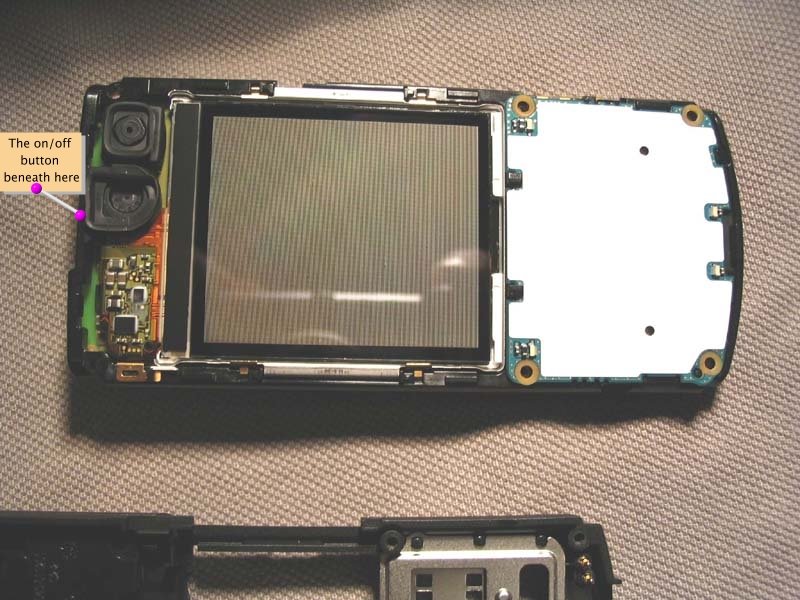
Reminder : This tricks is for temporarily solutions, and for a better solution, consult your phone's warranty company to be claim for warranty.
So I took it to the service centre at Lowyat Plaza, and fix it. I also ask them to reflashed my firmware, so that it can recognized chinese characters. Hence un-banana'ing in this post is actually means that reflashed the english firmware which unable to recognize chinese characters into the new firmware which able to recognize chinese characters.
It looks good, and when I first access to the clock function, it stated Beijing. LOL... Is that a China firmware? Maybe....... the things that I don't like is the font in messaging are extremely tall and skinny which looks abit awful for me. :P

Yet is fun to see the menu in chinese.. LOL..

Thats all for today's post la.. :)
Friday, September 22, 2006
Nokia N70
Wohoo.. I finally got this baby on last tuesday. This phone really impress me with its amazing speed, although it might be slow for some people, but hey.. for me it was fast enough. Compared to my old Nokia 6600, one of the ancestors of the S60 clan, N70 has an amazing speeds.
It was a busy week for me, not really busy but spend most of my time in the office. :P Hence I don't have really much time to fully explore my baby here. Well, the phone same as me, a banana who doesn't recognize chinese characters. Though N70 has the firmware that supports chinese font, but not for mine.. :( So no choice, I installed the chinese stars (which work charms in my Nokia 6600) into my N70. Too bad, it doesn't really work in N70 as the font still fail to renders. Then without giving out, I tried with the good old Q9 which is a chinese input software that work with most of the S60 phone from 3650 till my previous 6600. Too bad, in N70 case, the font is still not there. After some google work for few hours, FINALLY.. the are some software written by china or hk people called gpfep. It comes with mmcfonts plugin which enable the phone to renders the chinese characters. Now currently I am using gpfep fonts and input with the good old chinese stars. (As I too lazy to visit Nokia Center to get the firmware upgraded).
Apart from the chinese software, the webcam software refused to work too. I still can't get it worked till this moment and hopefully I can found another way of getting it works. My good old TV remote control also discarded as N70 doesn't has a IR port. At least it was not too bad as I seldom watch TV. :P
Comparing the audio quality, it somehow dissapoint me. Perhaps I am expecting too much from Nokia phone to be par with Sony Ericsson's walkman series audio quality. Yet if compared to my old Nokia6600, N70 was far far better. I will try to get my Pop-Port audio adapter which converts the jack to the standard 3.5mm port within this few weeks. With this port, I can test the audio quality further with my altec lansing speaker. I do reserve some hope on the quality. :P
For image quality, N70 as a 3G phone, it comes with dual camera which 0.3Megapixel infront and 2.0 Megapixel at the back. For the front camera, it was extremely terrible. The noise of the picture are very high, especially at the poor lighted condition. However the noisy reduce significantly under well lighted area. For the back camera, I like the way which we slide the cover to activate it. It save the trouble from navigating all the way in the menu to get the camera activated. The quality was acceptable yet we don't compared it to the Sony Ericsson phone again as SE camera has the autofocus. Yet, the absence of the autofocus in N70 doesn't make the camera too bad. In N70, there are several picture mode which you can choose and see which mode suits you better. (The setting revert back to default whenever I close the camera slide :S )
As for the memory expension, it uses dv-rs-mmc so the cards of my n6600 could not be compatible with it at all. The funny thing is, I've to figure around 5mins on how to get the tiny little mmc out of the tiny slots there. LOL.. Talking about tiny, the button (2) is really close with the navigation pad which I often face the problem of pressing the button (2). Remind you guys, my finger was not the really big, yet I face this problem. So for those who was big finger, I doubt you can press the button (2) happily without accidentally pressed the navigation pad. Oh ya, press and hold the (#) button does not switch your active line to line 2 already. Instead, it is a fast switch between your current profile to the silent profile and vice versa. It is pretty good isn't it? ;)
One thing I found out is N70 really want us to get to the gallery very much. Why? coz there is a gallery shorcut at the active panel, and the new media key (which appeared on N-series phone) gets you to the gallery too at the default settings.
K la, thats all for the short review for the N70. I'll continue my review when I am free to explore it futher. Below is the picture of my new N70 taken by the good old N6600. :P
And this is the picture taken by my N70.. XD (Unedited)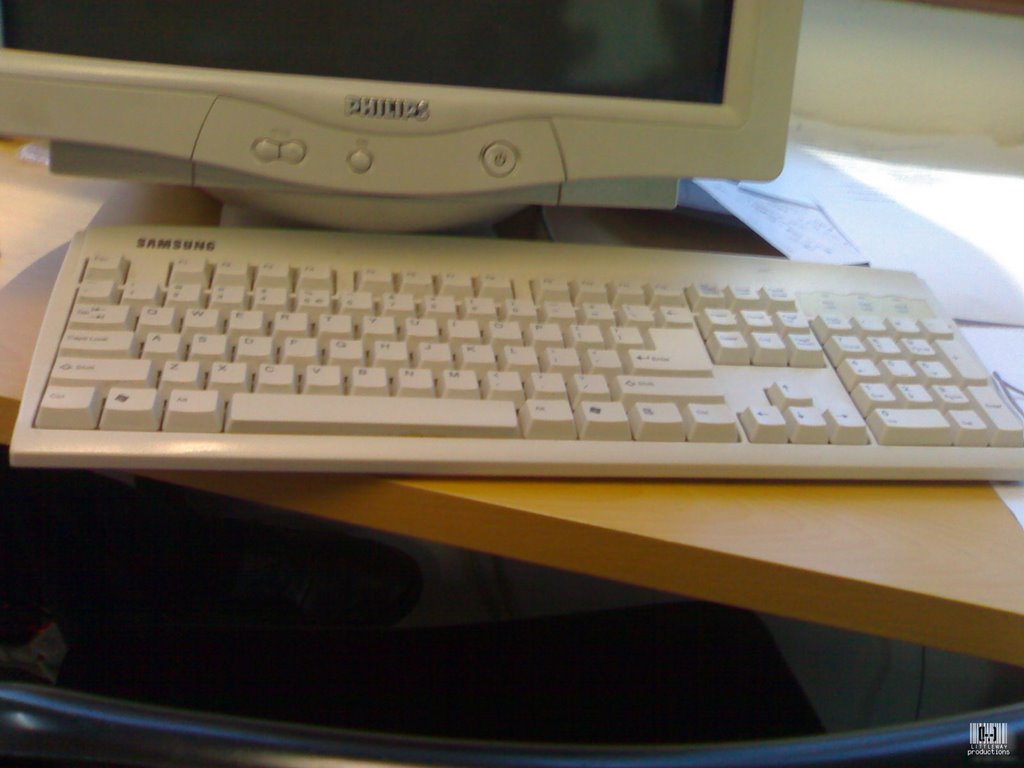
My humble phone desktop (Please ignore the littlway watermark at the middle XD)